
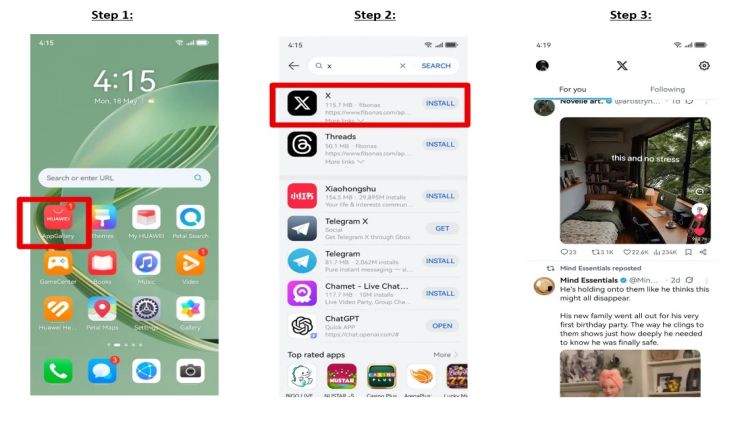
A social app becomes most useful when it works without extra effort: open it, sign in, and see what is happening around you. For Huawei users overseas, the simplest setup usually begins with AppGallery rather than an unknown download site. This guide explains how to install X, formerly Twitter, and keep huawei twitter working for news, travel updates, customer messages, and everyday conversations.
Start with HUAWEI AppGallery
Open AppGallery from the home screen and search for X. Check the app name and publisher before tapping Install. The Huawei Community landing page presents this as the direct route: open AppGallery, search for X, install it, and then launch the app from the phone.
Use a stable Wi-Fi connection and leave enough storage for the download and installation files. If AppGallery shows Open instead of Install, the app is already on the phone and may only need an update.
Sign in and check the essential features
Open X and sign in with your existing account. If the service asks for an email code, phone verification, or a security check, complete it before leaving your usual network. Then test the timeline, search, direct messages, photo uploads, and video playback.
Many users searching for huawei twitter only confirm that the app opens. A better test is whether it can send a message, load media, and refresh after the screen has been locked.
Allow notifications and background data
Go to Settings > Notifications, select X, and allow the alert types you need. Next, check mobile-data access and battery controls. If updates appear only after opening the app, allow background activity and make sure Data Saver is not blocking it.
Menu names can vary by model and EMUI version, but the aim is the same: let the app connect in the background without giving it unnecessary permissions.
Use safe alternatives when travelling
If the app is temporarily unavailable in a regional catalogue, open the official X website in a browser and add it to the home screen. Avoid modified APK packages, especially when the account contains private messages, saved payment details, or business contacts.
Changing the HUAWEI ID region should not be the first fix, because it may also affect local banking, transport, and delivery apps.
A simple setup that lasts
The reliable order is straightforward: AppGallery first, the official web version second, and troubleshooting only when a specific feature fails. For the original installation sequence, review the Huawei Community instructions for huawei twitter.