
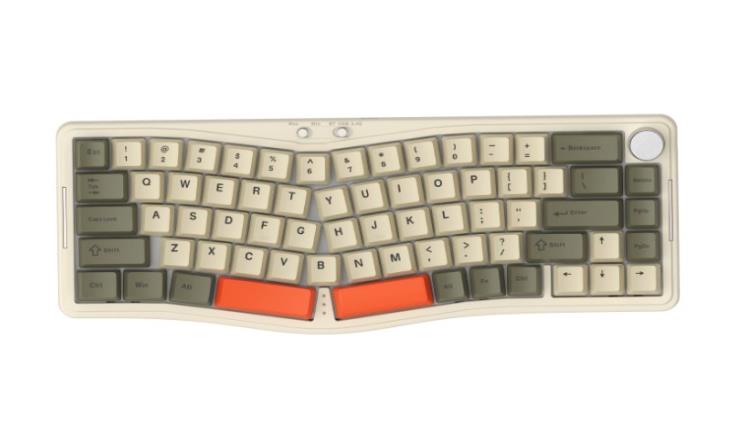
The difference between a good player and a great one often comes down to milliseconds—and the tools that shave them off. Professional gamers don’t just rely on raw talent; they meticulously customize every aspect of their keyboard setup to gain a competitive edge. From rebinding keys for faster ability rotations to swapping switches that match their exact actuation preferences, keyboard customization has become a cornerstone of high-level play.
This guide dives deep into the art and science of gaming keyboard customization, covering the critical decisions that directly impact your performance. You’ll learn how to select the ideal keyboard layout for your genre of choice, understand the mechanics and compatibility of 3pin switches, build a cohesive gaming peripherals ecosystem that minimizes latency, and master the programming of macro keys for complex in-game actions. Whether you’re troubleshooting compatibility issues or looking to automate intricate command sequences, these actionable strategies are designed for tech-savvy individuals ready to push their setups to the limit.
Choosing the Perfect Keyboard Layout for Optimal Gaming
Your keyboard layout directly influences how quickly you can access critical keys during intense gameplay moments. A full-size layout offers dedicated macro keys and a numpad—ideal for MMO players who need dozens of accessible bindings for abilities and inventory management. However, that extra real estate pushes your mouse further from center, potentially straining your shoulder during long sessions and limiting mouse movement in fast-paced shooters.
Tenkeyless (TKL) boards strike a practical middle ground, removing the numpad while retaining function rows and navigation clusters. FPS and battle royale players often gravitate here because the reclaimed desk space allows lower mouse sensitivity with wider sweeping motions. For the most compact option, 60% keyboards eliminate everything beyond the alphanumeric block, forcing reliance on function layers but delivering maximum mouse freedom and portability for tournament play.
When selecting your keyboard layout, consider two factors: available desk space and your primary genre. If you frequently switch between strategy games requiring extensive hotkeys and shooters demanding wide aim arcs, a TKL with programmable keys offers the best versatility. Players committed to a single competitive title should match their layout precisely to that game’s input demands—compact for aim-heavy titles, expanded for keybind-heavy ones.
Deep Dive into 3pin Switches: Compatibility and Selection
What Are 3pin Switches and Why They Matter?
Every mechanical keyboard switch sits between your fingertip and the PCB (printed circuit board), translating physical force into an electrical signal. A 3pin switch—also called a plate-mount switch—features a central stem housing, two metal contact pins that complete the circuit, and a single plastic center post for alignment. This contrasts with 5pin (PCB-mount) switches, which add two extra plastic legs for enhanced stability when mounted directly to a board without a plate. The distinction matters because 3pin switches are lighter, more universally compatible, and easier to install in hot-swap boards that use a mounting plate for alignment. For gaming, your switch choice between linear, tactile, and clicky variants determines actuation force, travel distance, and feedback—all of which affect how rapidly and consistently you can execute inputs under pressure.
Ensuring Your Keyboard Supports 3pin Switches
Before purchasing switches, verify your keyboard’s compatibility through three checks. First, confirm whether your board is hot-swappable—look for sockets (Kailh or Gateron-style) on the PCB rather than soldered connections. If switches pull out with a removal tool without desoldering, you’re working with a hot-swap board. Second, examine the PCB holes: a 3pin compatible board needs at minimum three holes per switch position (two for electrical pins, one for the center post). Nearly every hot-swap keyboard accepts 3pin switches since they require fewer contact points than 5pin variants. Third, check the switch footprint standard—most modern gaming keyboards from brands like ATTACK SHARK and other manufacturers use Cherry MX-compatible stems, meaning any 3pin switch from Gateron, Kailh, or similar producers will fit without modification. For gaming, linear 3pin switches with actuation forces between 40g and 50g deliver the fastest repeated keystrokes, while tactile options around 55g provide a bump that helps prevent accidental presses in games where precision outweighs speed.
Building a Cohesive Gaming Peripherals Ecosystem
A customized keyboard delivers its full potential only when it operates in harmony with the rest of your peripheral chain. Your mouse, headset, and keyboard should communicate through a unified software platform whenever possible—this reduces background processes competing for system resources and allows you to sync polling rates across devices. When your keyboard and mouse both report at 1000Hz through the same driver stack, input consistency improves because the system processes both streams with identical priority and timing.
Physical arrangement matters as much as software cohesion. Position your keyboard at a slight negative tilt with your mouse pad immediately adjacent, eliminating any gap that forces wrist repositioning mid-fight. Route cables together using a mouse bungee or desk-mounted clips to prevent drag interference, or invest in a wireless ecosystem from a single manufacturer to eliminate cable snag entirely while maintaining sub-1ms latency through proprietary dongles. Ensure your headset’s communication software doesn’t conflict with your keyboard’s macro engine—overlapping hotkey assignments between peripherals create input delays or dropped commands during critical moments.
The payoff of an integrated setup extends beyond raw speed. Consistent actuation feel from your switches paired with a mouse sensor that tracks at matching responsiveness creates muscle memory that transfers reliably between sessions. When every peripheral responds predictably, you stop thinking about your tools and focus entirely on the game.
Mastering Advanced Customization with Programming Macro Keys
Getting Started with Macro Key Programming
Macro keys transform repetitive multi-step actions into single button presses, giving you a tangible speed advantage in games that demand complex inputs. Programming macro keys begins with your keyboard’s companion software—applications like iCUE, Synapse, or G Hub provide visual interfaces where you record keystroke sequences, assign delays between inputs, and bind the result to a dedicated key. To create your first macro, open the software, select the key you want to assign, choose “record macro,” then perform the exact keystroke sequence you want automated. Most platforms let you toggle between recording actual timing delays or inserting fixed intervals, which is critical for games that require frame-precise input chains. Once recorded, test the macro in a practice mode before deploying it competitively to ensure the timing aligns with in-game animation locks or cooldown windows.
Advanced Macro Strategies for Competitive Edge
In MOBAs, programming macro keys for ability combos eliminates fumbled rotations during teamfights—bind a full burst sequence (ability one, pause 50ms, ability two, pause 30ms, ultimate) to a single key so execution becomes instant regardless of pressure. FPS players benefit differently: macros that toggle crouch-spam patterns or execute precise lean-peek sequences provide movement advantages that are difficult to replicate manually at consistent speed. For resource management in strategy or survival games, create macros that cycle through inventory slots and activate items in optimal order, freeing your mental bandwidth for tactical decisions. The key to effective macro design is keeping delays realistic—zero-delay macros often trigger anti-cheat detection or produce inputs faster than the game engine processes, causing dropped commands. Set intervals between 20ms and 80ms depending on the game’s tick rate, and create multiple macro profiles you can swap between titles so your programming macro keys investment adapts as your game library evolves.
Step-by-Step Guide to Customizing Your Gaming Keyboard
Assessing Your Setup and Defining Customization Goals
Before making any changes, spend a week consciously noting friction points in your current setup. Track which keys you mispress during intense moments, whether your hand cramps after extended sessions, and if any commands feel sluggish or inconsistent. Open your most-played game and identify the five actions you perform most frequently—these become your optimization priorities. Check your keyboard’s specifications by looking up its model number: determine if it supports hot-swap sockets, what switch type is currently installed, and whether the manufacturer provides customization software. Document your desk dimensions and current peripheral positions, noting how far your mouse hand travels from your keyboard during gameplay. This assessment creates a clear roadmap so every modification serves a specific performance goal rather than chasing upgrades blindly.
Implementing Hardware and Software Changes
Start with hardware modifications by selecting 3pin switches that match your assessment findings. If you identified accidental keypresses as a problem, choose tactile switches with a pronounced bump; if speed was your bottleneck, opt for linear switches with light actuation force. Power down your keyboard, use a switch puller to remove existing switches from hot-swap sockets, and insert replacements by aligning the two metal pins and center post with the PCB holes—apply even downward pressure until the switch clicks into place. Next, install your keyboard’s companion software and create a game-specific profile. Remap any awkward bindings you identified during assessment to more ergonomic positions, then program macro keys for your most complex repeated actions using delays between 30ms and 60ms. Adjust your keyboard layout settings within the software to disable keys you never use during gameplay, preventing accidental activations.
Testing, Tweaking, and Optimizing Performance
Enter your game’s training or practice mode and systematically test every modified binding and macro. Execute each macro ten times consecutively, watching for dropped inputs or timing mismatches with in-game animations. If a combo macro fires too quickly, increase delays by 10ms increments until the game engine registers every input cleanly. Test your new switch feel by performing rapid repeated keypresses—strafe spam in an FPS or ability rotations in a MOBA—and note whether the actuation force causes fatigue after fifteen minutes of sustained play. If it does, consider switches five grams lighter on your most-used keys. Save your optimized profile and export a backup file, then create separate profiles for each game in your rotation. Revisit your settings monthly as games receive patches that alter ability timings or input windows, ensuring your macros stay synchronized with current mechanics.
Turn Every Keypress into a Competitive Advantage
Every customization choice you make—from selecting the right keyboard layout to swapping in 3pin switches tuned to your playstyle—compounds into a measurable competitive advantage over time. The layout you choose determines how efficiently your fingers reach critical bindings, while properly matched switches ensure every keypress registers exactly when intended without causing fatigue. Integrating your keyboard into a cohesive gaming peripherals ecosystem eliminates the inconsistencies and input conflicts that cost rounds, and programming macro keys turns mechanically demanding sequences into reliable single-press executions.
These aren’t theoretical improvements. They address the real compatibility questions and performance bottlenecks that tech-savvy players encounter when pushing their hardware to its limits. The framework is straightforward: assess your current pain points, implement targeted hardware and software changes, then test and refine until every input feels instinctive. Start with the modification that solves your biggest frustration today—whether that’s a switch swap for better actuation feel or a macro that automates your most complex combo—and build from there. Your keyboard is the most intimate point of contact between your intentions and in-game results, so make every millimeter of it work for you.